Honestly, I was looking for a big time messenger that was going to out beat all Yahoo!'s past and other popular messengers out there. That came to an end as the Yahoo! Messenger team abruptly ended the Yahoo! Messenger for Vista project. Apparently, they stopped the process because it was taking resources to make a casual messenger (Yahoo! Messenger 9) better.
People that have commented on the Yahoo! Messenger blog have posted mixed opinions. From blaming Vista, to blaming Yahoo! on being too weak.
My opinion on all this is the following. I think the Yahoo! Messenger team WAS too weak. The fact that creating such a powerful messenger was just too much for the team. Not only that, I think the "team" is just a few members, 10 at most. Though it is hard to build a software from the ground up, it must have been done. Yahoo! is the last messenger giant that I'd expect to back off. This really puts them on a low spot, starting something millions of loyal users found interesting and used then just scraped it. This is a low move for Yahoo! Messenger.
Tweet This
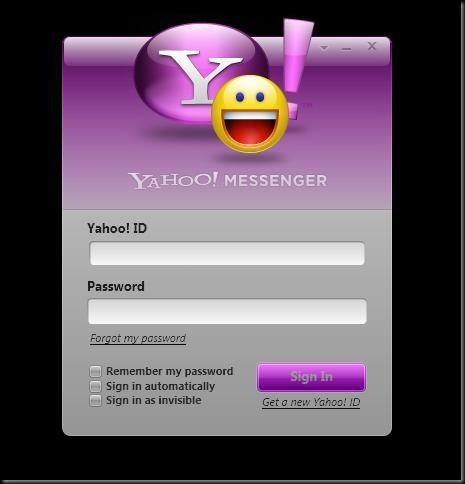
Better late than never I must say! Yahoo Messenger for Vista is out of the preview stage and now into the BETA. The current version out is Yahoo Messenger for Vista Beta (1.2.0.1029) and it is showing signs of it being alive and kicking! I've just included two screen shots which are of the sign in and sing on. They are changed and well a bit user friendly now.
Below is the Sign-In screen. As you can tell, it now has a glossy Vistaish look and feel.
As for the one below is the Sign-On screen. It has a bit of a fruity look but it's better than the older plain black look...
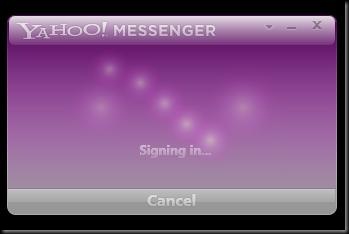
Although Yahoo still has a bit of a way to go with this newly rebuilt, or built from the ground up, messenger, progress is showing. That, at least, is the good news. I still have to honestly give two thumbs up for this new version.
Now as what comes with the new release. YAY! In this release version you'll find that 2 of 8.1's features are included. One being SMS texting from messenger to cell phone and vice versa. It is a nifty feature that seems flawless. I've tested it and so far no hiccups or glitches. It has my approval, at least until I find a hiccup.
The second feature added is voice. Not where the messenger talks back to you, that'd be a bit freaky and I don't think humans are ready for that. I'm talking about PC to PC, PC to Phone or vice versa of each one of those. So far I haven't gotten the chance to test this one so don't take my word for it. I do have to say it is a good one though.
Ok well I guess you can say I mislead you on the screen shots. A friend of mine wants to be "popular" so I just asked him to message me a corney message. Take a look at the messenger's IM screen.
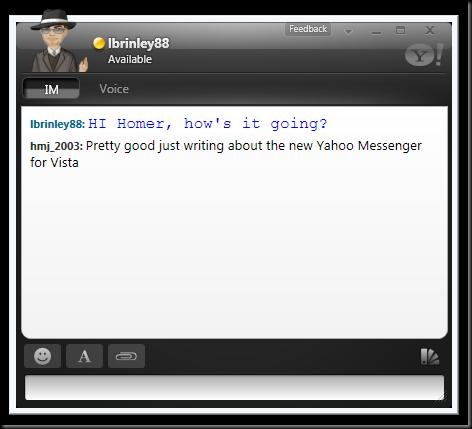
As you can see the "IM" and "Voice" tabs. But don't get all giddy about it, it is still in BETA stage so all hiccups and suggestions should be sent to the "Feedback" link at the top of the messenger.
This is it for me today. And as a note on you YouTube fans just eager to see my chunky body of love, I should be posting my introduction video soon. I'll keep you guys posted. I'm out, take care!
Oh, here's the link to read more about Yahoo Messenger for Vista Beta on Yahoo Messenger's Blog.
And here's the link to download Yahoo Messenger for Vista Beta directly from Yahoo Messenger.
Tweet This
You know, I wonder what Vista SP2 is going to be like. I looked up some potential info on a possibility of a Service Pack 2 for Vista since Service Pack 1 has just come out. Interestingly, I didn't find any. But what I did find was sarcastic and reasonable comments in forums and articles. One I found interesting was on a site called "Tom Raftery's Social Media." The following quote is from Tom's site and wasn't edited in any way. "Vista is so buggy that I don’t think Microsoft will address all the problems in their first Service Pack release. Like Windows XP, Vista will not be reliable until SP2."
I did some research, which took me a few days to gather up, and what I found was true! See I was raised into an XP SP2, since it was installed in my first computer I got to own, so I really don't know if SP1 or just plain ol' XP had major or any user impacts. Every forum I found from the release of XP were negative, just like Vista. XP SP1 came out and most of everyone's complaints were fixed. XP SP2 came out then it was finite, perfect.
When XP came out, people were used to the Windows 95, Windows 98, Windows ME, and Windows 2000 (I might have missed some). XP was a whole new look and feel. Once you get used to something you just don't want to change it. But what XP was compared to all the others before it was a 21st century feel, a new look.
And when Vista came out, it was the end of the world to XP users. They were comfy knowing little resource usage, fast speeds, and reliability. With Vista, its just heavy on those. It needs the juice to run the new graphics, the kernel core, and the rest of the operating system. What Microsoft failed to realize, people don't have the money or the resources to upgrade their PCs. That's why many people weren't happy with it. And those who bought a computer with Vista installed just didn't like the new feel, unless it was their first computer. To those Vista is an awesome system. What I think people should start realizing is that Vista is new and XP is old. Whether you like it or not, Vista will conquer. That is until Windows 7 comes out.
If you want to read Tom Raftery's page with the quote I used here you can click here: tomrafteryit.net
Personal thoughts:
I'd say, upgrade to your system for Vista and just give it a try. Either that or just buy a new computer that is compatible for it. Trust me, the longer you use it, the more you'll like it.
(Please share your thoughts, comment please.)
Tweet This
It's true. I'm late at posting this but if you haven't heard the news yet, Vista SP1 is here! I downloaded the standalone package from Softpedia.com but you can do it many ways. Some are safe and others are, well just risky. The safe methods are 1: From Microsoft directly, either from the manual update or "Microsoft Download Center." Or 2: A trusted side like "Softpedia.com."
The standalone package comes in a 434MB nifty package. It took me about an hour just to download and install it. Time will vary depending if you have high speed internet, which would be better for downloading the standalone, or if you have dial-up. If you have dial-up, there's one of three things you can do to get it. 1: Do a manual update (which would take a few hours to a few days to get it all), or 2: Wait for the automatic update for Vista SP1 which would take a while to get it. Or 3: Take your computer to a friends house, if they have high speed internet, and do the update there. If they really are good friends they'd let you.
Here are the two links that I know are safe and have Vista SP1 in a 5 language standalone package.
Microsoft's Download Center
Softpedia Windows Downloads
Good luck!!! And please comment on my articles (blogs)
Tweet This
I'm sure no one has really given much thought to the reason why it's taking so long for Microsoft to release SP1 for Vista. The more people have to wait, the more people look for it.
Now-a-days there's many ways of getting what you want with just an internet connection, time, and the right resources. I think this is why it might it has taken so long. Apparently and according to Softpedia there's a new leak of Vista's SP1. This time it's Vista Ultimate.
Do you think the people who are waiting for Vista SP1 have to wait so long because there are too many boot-legged copies out? I think the more boot-legs there are of Vista and Vista SP1 the more Microsoft punishes us.
Tweet This
I know I'm quite late on this topic but I'm finally out with it. I saw yesterday (Dec. 12 2007) that Vista SP1 Release Candidate was out to the public and I decided to try it out. I figured that it's more stable than the beta. It is!!! Any who, I have friends asking me about Vista SP1 Pre-Final. I'm not tired of telling them where to look for it, I'm just getting to many requests for it. And when I say too many, it's like 20 so far ^_^. Ok any who, I tracked down a site that I used to get more info on and download Vista SP1 Release Candidate via Windows Vista Team Blog under a blog titled: "Windows Vista SP1 RC now available for public download"
The following two screen shots are right after the installation of Vista SP1
SP1 change

small watermark from installation

The small water mark above is found above where above the clock. It's not an annoyance unless you constantly look around the clock area with no windows covering it. It will go way when the final version of SP1 comes out.
Features:
So far I've taken advantage of choosing what drive you want to defragment.
End notes:
- This is the most stable version of Vista SP1. If you want to try it, you will have to go through a Windows Update and Windows installing those updates. No worries if you can't find them via the Windows Update. They'll be installed when you install the Service Pack.
- Installation tips: When I got my small package from Technet I extracted it to my desktop because it's a zipped file. You have to run the script and then proceed with the Windows Update manually. You should then get a list of updates. Those are the ones I told you about that you'll need. After all those are installed, you'll get the Windows Vista Service Pack 1 Release Candidate 1. Merry Christmas.
Courtesy from: WindowsVistaBlog.com Technet.Microsoft.com and Blogger.com
Tweet This


